Tips on Developing Web Applications for Web Farms
?
The CityU central web servers (www.ncm2.xyz and www6.cityu.edu.hk) are load-balanced web farms, which provide high availability services to the communities. In case any server instance of a web farm is unavailable (due to errors or maintenance), other server instances of the same web farm can still serve requests without service interruptions.
- Locate and edit the web.config in the application root folder.
- Add a <machineKey> section under <system.web>.
<machineKey> section defines a pair of keys, validationKey and decryptionKey, which is used for encrypting, decrypting and validating session data. This pair of keys can be generated by the IIS Manager of your development PC as follows:
- On your development PC, run the Internet Information Services Manager (inetMgr.exe)
- Double-click “Machine Key” to open the Machine Key feature
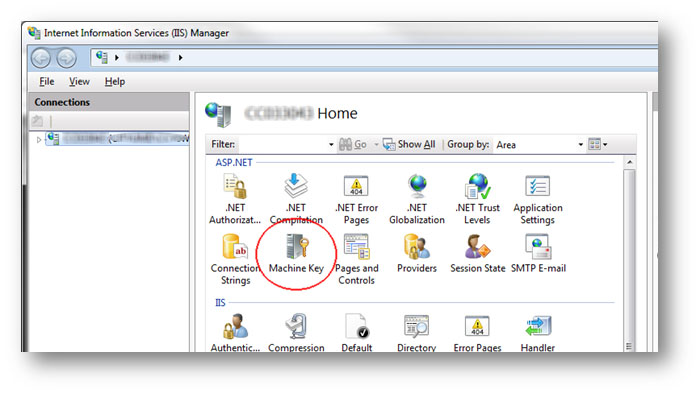
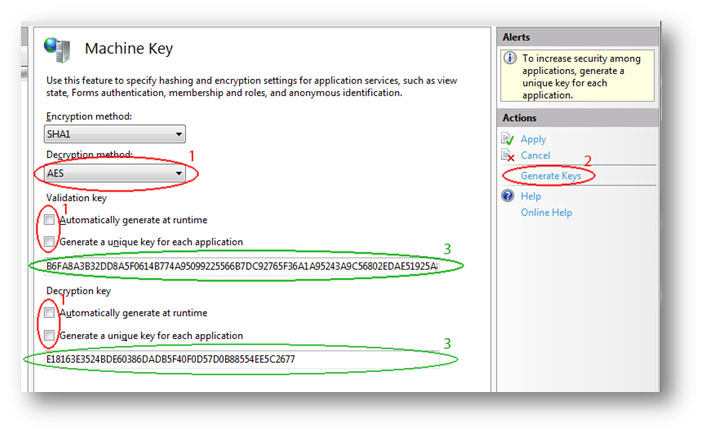
- Select “AES” under “Decryption method:” and un-check “Automatically generate at runtime” and “Generate a unique key for each application” under “Validation key” and “Decryption key” respectively
- Click “Generate Keys” in the “Actions” panel on the right
- Copy the generated “Validation key” and “Decryption key” into the <machineKey> section under <system.web> in the web.config file as shown below:

(For security reasons, please generate different machine key pairs for different web applications.)
A Note for Using Classic ASP
Classic ASP stores session information in web servers, and therefore web applications developed by Classic ASP cannot share session information among server instances. If your web applications require storing data in a session, please consider building your web applications with ASP.NET instead.
References
- How To: Configure MachineKey in ASP.NET 2.0
https://msdn.microsoft.com/en-us/library/ff649308.aspx - IIS 7 Tip # 10 You can generate machine keys from the IIS manager
https://blogs.msdn.microsoft.com/vijaysk/2009/05/13/iis-7-tip-10-you-can-generate-machine-keys-from-the-iis-manager/ - ASP and Web Session Management
https://msdn.microsoft.com/en-us/library/ms972338.aspx